The Q.wiki Content API for process modules allows you to query content from process modules programmatically. Typical use cases include integration with enterprise search, chatbots, or automated reporting.
Overview
The API allows access to content from process modules while respecting the permissions of the respective user. Only pages that you have access to will be returned.
You can find the complete technical documentation at https://<tenant>.qwikinow.de/external-api/v1/docs (replace <tenant> with the name of your Q.wiki instance).
Create an authentication token
To access the API, you need a personal token. Any user can create tokens with their own permissions.
- Navigate to User > My Profile > Content API.
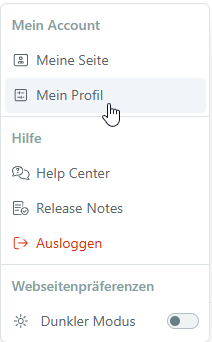
- Click on Add Token.
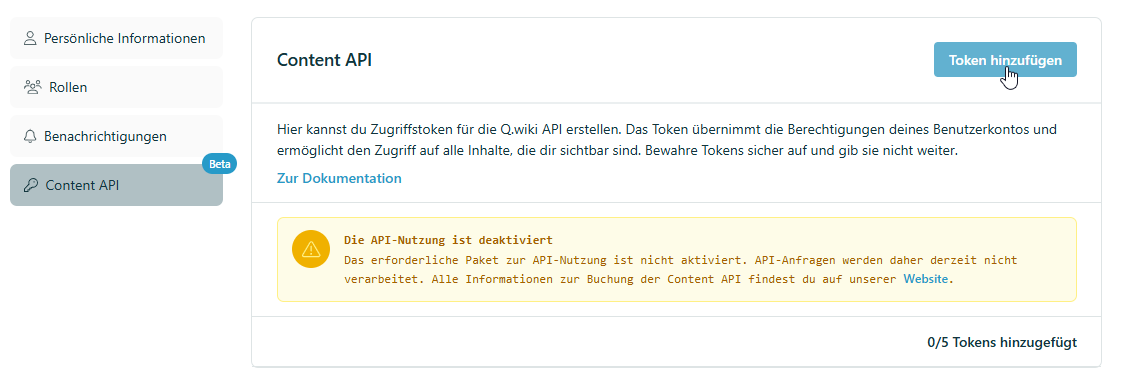
- Give the token a name and define its validity period.
- Save the token securely – it will be needed for all API requests.
Known limitations (Beta)
| Topic | Limitation |
|---|---|
| Module filter | Currently does not return information about organizational units (OU). |
| Module IDs | Must be passed as a comma-separated list. |
| Permissions | Authorized users per page are currently not retrievable via the API. |
| Change proposals | Change proposals have no effect on the last_changed_at field. |
Related articles
Was this article helpful?
That’s Great!
Thank you for your feedback
Sorry! We couldn't be helpful
Thank you for your feedback
Feedback sent
We appreciate your effort and will try to fix the article