With the enhanced reading confirmation with AI comprehension questions, you can now reliably verify whether employees have not only read but also understood the content. Through targeted questions, you focus on what matters and ensure effective knowledge transfer.
Benefits of enhanced reading confirmation
- Secure understanding: The reading confirmation poses comprehension questions that guarantee changes and content have actually been read and understood.
- Focus on essentials: You selectively choose questions that highlight central topics and are most important to your employees.
- Automated questions: The AI automatically generates relevant questions based on page content – less effort in creation.
- Flexibility: All questions and answers can be edited, supplemented, or removed to support your learning objectives.
Step-by-step: Activation
- Open the page and click Edit.
- Turn on Reading Confirmation and select your target audience.
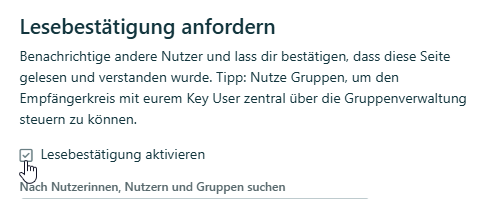
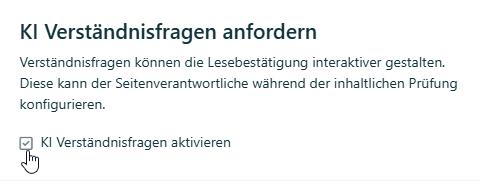
- Enable AI Comprehension Questions in the same modal below.
Note: AI comprehension questions are part of the AI package. Request an offer (external).
Generate and edit questions
When you perform a content approval, a modal appears for generating and editing:
- Select the number of questions to be generated.
- The AI automatically creates questions based on your page content.
- Edit, add, or remove questions and answers as needed.
- The modal appears with each approval, so you can review and adjust questions.
Release and verify understanding
After clicking Approve, the reading confirmations with comprehension questions are sent to your employees. To complete the reading confirmation successfully, they must answer the questions with more than 60% correct answers.
Tracking and overview
The page owner always has an overview in the Reading Confirmation Tracking. There you can see who has successfully answered the questions and which people are still pending.
Was this article helpful?
That’s Great!
Thank you for your feedback
Sorry! We couldn't be helpful
Thank you for your feedback
Feedback sent
We appreciate your effort and will try to fix the article