Important: You need Key User permissions to perform the following steps.
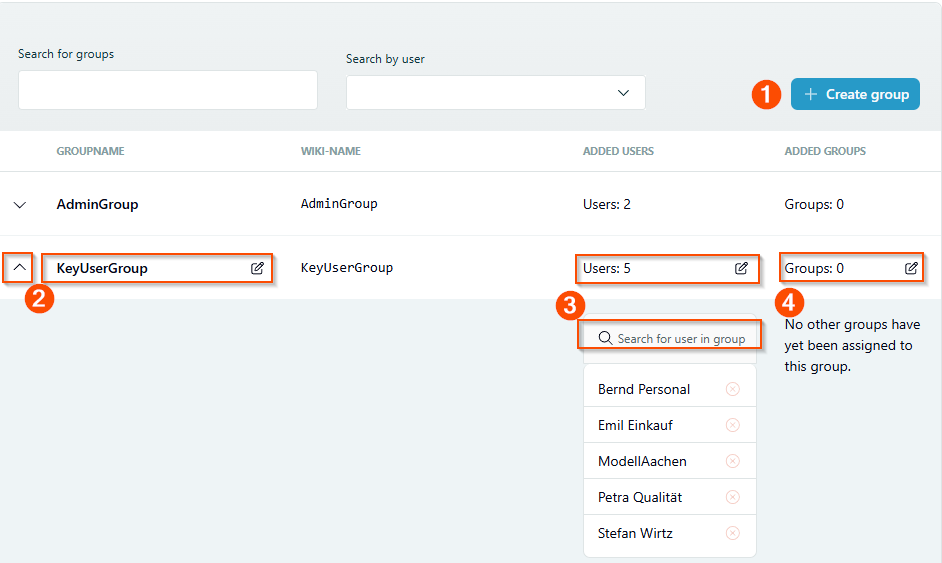
The Group management tool in the Tool menu lets you manage all Q.wiki groups: add or remove users, rename groups, and nest groups.
Step by step
Add users
- Open the Tool menu and select Group management.
- Click on the user count of the group you want to add members to.
- Enter the name of the new user in the field. The system filters automatically as you type.
- Click on the user's name to add them.
Remove users
- Open the Tool menu and select Group management.
- Click on the user count of the group to view the member list.
- Enter the name of the user you want to remove in the filter field. The system filters automatically.
- Click the delete icon next to the user's name to remove them.
Add or remove groups
Groups can also be added to other groups (group nesting). Follow the same process as for adding or removing users: click on the count of integrated groups and select the group you want to add or remove.
Good to know
Tip: When you add users or groups to a group with advanced permissions, the change takes effect with a slight delay. This is normal and is caused by synchronization with your directory system.
Was this article helpful?
That’s Great!
Thank you for your feedback
Sorry! We couldn't be helpful
Thank you for your feedback
Feedback sent
We appreciate your effort and will try to fix the article