Important: You need Key User rights to perform the following steps.
With Q.wiki, you can customize your company logo – either globally for all areas or individually per unit.
Prerequisites
- Key User rights
Step-by-Step
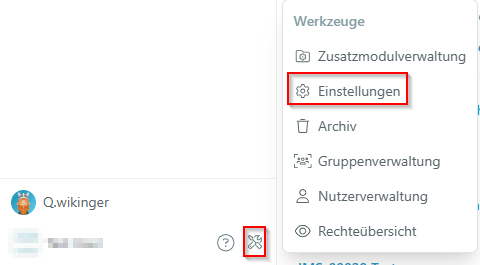
- Open the Tool menu and click Settings at the bottom left.
- Navigate to the Logo section. You'll see options to change the logo – either globally for all areas or individually per unit.

- Select a location if needed (in multi-site systems): Use the Location filter to set the logo for individual locations.
- Upload your logo: Click Update logo and select an image file or drag it onto the upload area. Recommended format:
png(jpg, jpeg, and bmp are also supported). Scaling is adjusted automatically. - Click Upload logo file to save your changes.
Result
Your new logo is now visible in Q.wiki – either globally or only for the selected location.
Was this article helpful?
That’s Great!
Thank you for your feedback
Sorry! We couldn't be helpful
Thank you for your feedback
Feedback sent
We appreciate your effort and will try to fix the article